Eshop integration with ERP
Over 15 Years of Experience in ESHOP ERP Integrations - Hundreds of Successful Installations
Are you the owner of an online shop (B2B or B2C) and feel like you’re wasting valuable time on processes that could be automated?
Many businesses find themselves in the same position because they haven’t connected their online store with their corresponding ERP system. This means everything requires human intervention, essentially doubling the workload with no added benefit. From updating product prices and stock inventory to processing orders and invoicing, valuable work hours are spent that are difficult to recover.
How would you feel if you had the right online support, ensuring everything runs smoothly throughout the process without requiring staff intervention? Have you considered how much time you waste unnecessarily without maximizing your profits at the same time? Why settle for outdated technology when you can choose cutting-edge solutions tailored to your needs?

Top eShop and ERP Integration – Without Limitations
The integration with your commercial application offers you
PROCESS AUTOMATION
Full automation from ordering to invoicing eliminates the need for human intervention, ensuring a smooth workflow. Data update from ERP to eShop is bulk and instantaneous, covering functions such as item management, category management and other key circuits.
SYNCHRONIZATION
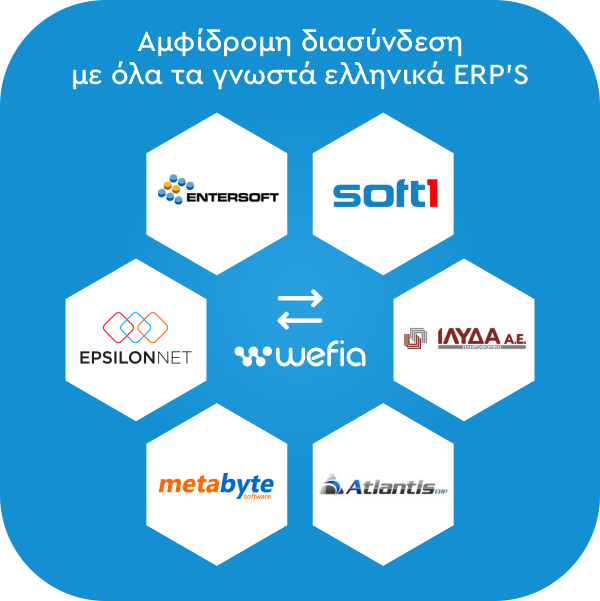
Product categories, product information (descriptions, features, brands, manufacturers), prices, stocks, payment and shipping methods are automatically synchronized between ERP and eShop. At the same time, orders are entered directly into the ERP, and customer tabs are created where needed, ensuring accuracy and consistency.
Customization for Specialized ERP Functions
If your ERP requires unique functionality (e.g., special invoicing, multiple warehouse management or unique data formats), these can be integrated with custom development. It is possible to develop custom plugins that communicate directly with your ERP, keeping Wefia's core code intact.
Support for Custom Data Flows
The interface can be customized to synchronize data such as products, inventory, orders, customers and invoices with your ERP. Customization is available for specific data streams or business processes that your ERP requires.
Which data are synchronized between ESHOP and ERP?
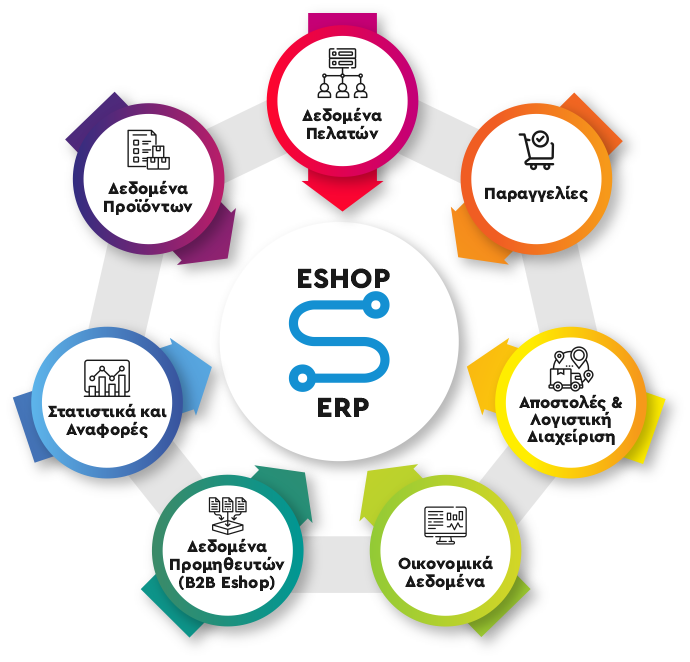
Product descriptions: title, description, technical characteristics.
Product categories: grouping of products into categories/subcategories.
Product prices: current prices, discounts, special offers.
Availability and Stock: Update the number of products in stock.
Product images: upload or update images for online presentation.
SKU/Barcode: Synchronize unique product identifiers.
Order Details:
Order number, date, products, quantities, total amount.
Order status:
Pending, in process, shipping, completed, cancelled.
Payments:
Payment information, method (e.g. card, bank transfer), payment status.
Returns and Replacements:
Information about requests for returns or product exchanges.
Customer Information:
Names, contact details (email, phone), addresses.
Customer preferences (e.g. favourite products).
Purchasing history:
Lists of previous orders, dates, amounts.
Discounts and Reward Points:
Special discounts or customer reward programs.
Mission Data:
Shipping addresses, courier, tracking number.
Shipping costs: Calculation based on weight, destination or service selection.
Pricing:
Issuing invoices and receipts.
Synchronisation with tax regulations and VAT categories.
List of Suppliers:
Information of partner companies.
Suppliers:
Automatic orders for new stock.
Supplier Invoicing:
Product import cost information.
Payments and Charges:
Recording of payments (online and offline).
Customer liabilities (e.g. payment balances).
Costs and Reports:
Aggregated financial data, such as turnover, profits.
Sales:
Synchronization of sales data from the website to the ERP.
Performance reports:
Gathering data to create reports (e.g. most popular products, customer statistics).
ERP Integration WITH THE Solution

The solution wefia is recommended for very large eShops or websites that wish to have full integration with their ERP system. Wefia is a next-generation framework. It is an application based on technologies like Asp.Net, SQL Server, and IIS. The organizational structure of the framework and the innovative solutions it offers make it one of the most powerful and ergonomic web development applications! Moreover, Wefia has been implemented in large-scale projects, such as the B2B of Mikel, Natura Siberica, Next, Salt and Pepper, and hundreds of others, proving its reliability and flexibility.
Why ASP.NET Core?

Speed: The fastest framework on the market
Performance: Optimized code
Reliability: With the guarantee of Microsoft
Success Stories
NEXT S.A.
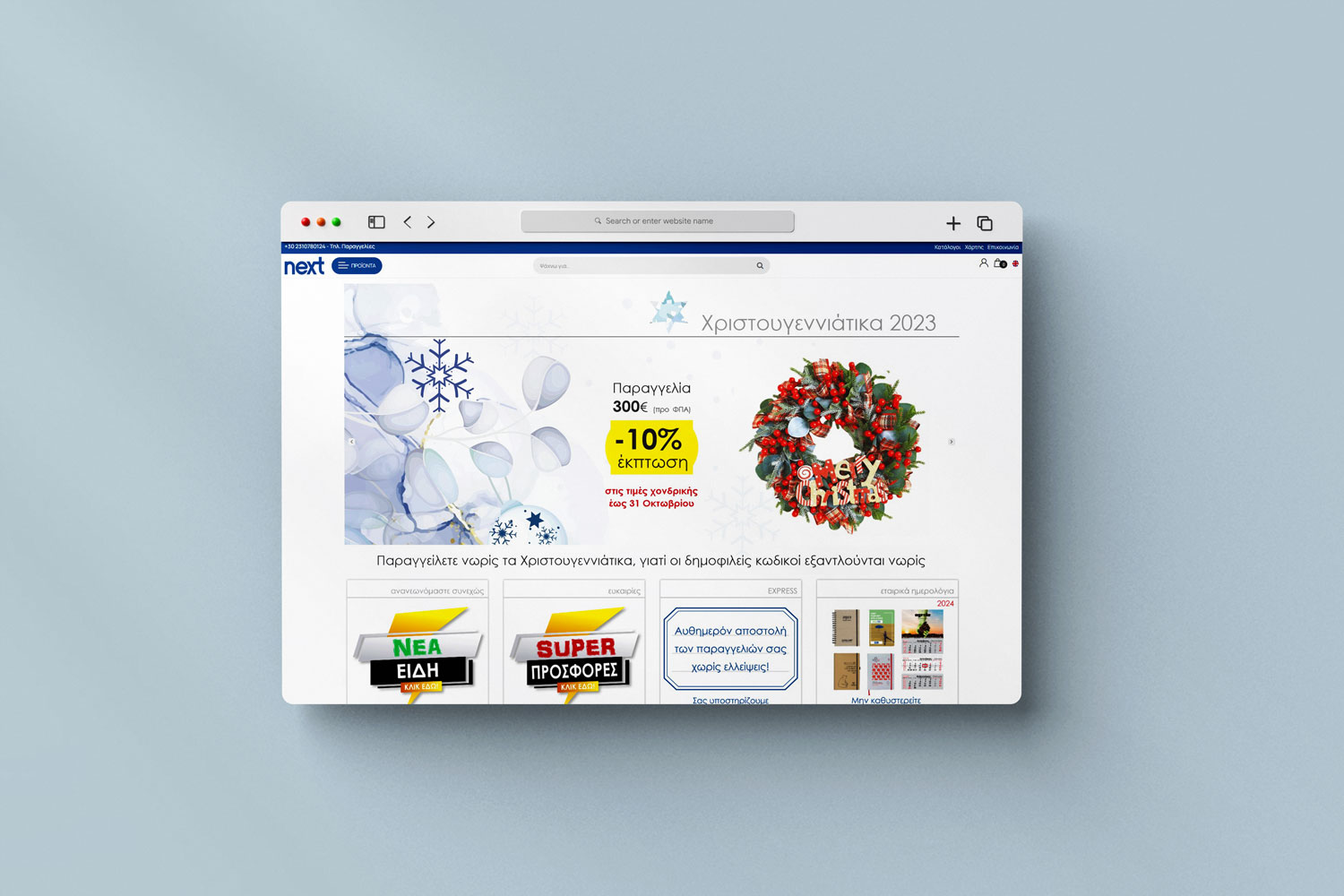
With over 30 years of experience in graphic arts and stationery products, NEXT S.A. was seeking a modern digital solution that reflects its quality and dynamism. We created an integrated B2C and B2B eshop for nextstore.gr, offering a harmonious experience for both retail and wholesale, while connecting the digital world with the company’s rich history.
The customized solution includes:
- B2B and B2C in one eshop
- Complex pricing policy
- Custom shipping cost calculation
- Dynamic PDF catalog generation
- Personalized item lists
- Order creation from excel for B2B
Raptopoulos SA
Raptopoulos S.A., a leader in furniture materials in Greece, trusted the Wefia platform to create the largest Greek B2B eshop in the industry. The eshop offers an advanced user experience with features such as asynchronous integration with the SoftOne ERP, live stock updates, and order management via Excel.
The solution we developed includes:
- Support for multiple units of measurement
- Personalized price display
- Reorder functionality
- Optimized user experience to boost sales

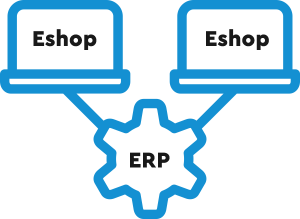
Multiple eShops connected to the same ERP
Want to manage multiple eShops with ease and accuracy? With Wefia’s interface, you can connect multiple eShops to a common ERP, regardless of each eShop’s installation or database. The data source remains the ERP, while each eShop is synchronized independently, leveraging modular architecture and custom integrations.
Centralized Order Management
Synchronize orders from all eShops with the ERP for centralized management. ERP routes orders, updates status (e.g. processing, shipping) and manages returns, ensuring immediacy and accuracy in operations.
Frequently Asked Questions (FAQ)
Wefia is linked with ERP systems via web services, using the available APIs of your commercial system. In cases where it is not possible to use ERP APIs, Wefia itself takes over as an API, enabling the interface through custom integrations. This ensures two-way communication and data synchronization.
The interface can be fully customized to your business needs, with options for real-time or predefined interval data synchronization. Wefia’s modular architecture ensures smooth operation, flexibility and scalability of the platform, even in environments with complex requirements.
With the integrated interface we achieve through the Wefia solution, updating data from ERP to eShop becomes a simple and immediate process. Your item data is synchronized bidirectionally and in real-time, ensuring that any change you make in the ERP is immediately reflected in your eShop.
Wefia’s technology enables instantaneous synchronization (at the millisecond level), ensuring that you don’t have to wait seconds or minutes to see your changes online. All modifications are instantly displayed to your customers, providing an exceptional experience of speed and accuracy.
In this way, Wefia gives you complete control over your data, saving you time and significantly improving your eShop user experience.
- Scale and Performance
Wefia is designed for large enterprises, offering the ability to manage thousands of products and handle high traffic volumes with ease. It supports larger databases and delivers superior performance for stores with numerous products. - Customizability and Scalability
It provides excellent flexibility for customizing functions through the code. It’s ideal for businesses that want to expand and require tailored features to suit their needs. - Built-in Features
Wefia comes with more advanced “out-of-the-box” features compared to WooCommerce, such as advanced pricing and inventory management tools. - B2B Capabilities
Wefia specializes in B2B business needs, with features such as special customer pricing, real-time pricing policies, corporate accounts, and advanced order management options. - Security
It offers a higher level of security compared to WooCommerce, thanks to its structure and regular security updates. It includes tools for PCI compliance, which is critical for large e-shops. - API Support
Wefia provides built-in API support for integration with third-party systems (ERP, CRM, etc.), making it ideal for large businesses with complex requirements.
As both solutions are highly reliable, here are the key advantages of Wefia compared to Magento:
1. Technological Foundation
ASP.NET Core Framework: Wefia is built on the Microsoft ASP.NET Core framework, which provides high performance and security. If your business already uses Microsoft technologies, Wefia can integrate more easily into your existing ecosystem. Almost all commercial systems in the market operate in a Microsoft environment using Microsoft SQL Server, just like Wefia.
2. Built-in Features
Rich Set of Features: Wefia offers extensive built-in features such as multi-store management, multi-supplier support, and advanced SEO tools, without the need for additional plugins or extensions.
3. Cost and Pricing
Although Wefia is a closed-source platform, it is available at a very attractive price, making it a cost-effective option for small to medium-sized businesses. In contrast, Magento offers a free open-source version, but its more advanced editions come with high licensing costs.
4. Security
Reduced Security Threats: Thanks to its use of the Microsoft framework, Wefia faces fewer security threats compared to Magento, which is written in PHP and may have more vulnerabilities.
5. Development
One of the biggest advantages of Wefia over Magento is the ease of developing new custom features without affecting the core code. This is a crucial factor for the long-term maintenance and smooth operation of an e-shop.
In summary, Wefia is a powerful and cost-effective solution for businesses looking for a platform with rich built-in features and based on Microsoft technologies. On the other hand, Magento offers greater flexibility and customization capabilities but may require more resources for development and maintenance. The final choice should depend on the specific needs and goals of your business.
Here is the continuation of the translation into English:
The main differences between Wefia and Shopify are focused on factors such as hosting, flexibility, cost, and technical support. Specifically:
- Hosting
- Wefia: It is self-hosted (self-hosted platform), meaning you have full control over your data, performance, security, and server configuration.
- Shopify: It is hosted (SaaS), meaning Shopify manages the hosting for you, providing simplicity and convenience. However, it limits customization flexibility.
- Cost
- Wefia: It includes costs for hosting, maintenance, and potential customizations, but does not incur additional monthly subscriptions.
- Shopify: Operates with monthly subscriptions starting at $30 and can go up to $400 or more depending on the plan. Additionally, there are extra charges for using external payment gateways (payment providers).
- Flexibility and Scalability
- Wefia: It is fully customizable, with access to the code, allowing for the development of specialized features. It is suitable for businesses with complex needs or customized requirements.
- Shopify: Limits customization to the options provided by its themes and apps in the Shopify App Store. It is considered a more “closed” system compared to Wefia.
- SEO Features
- Wefia: Offers advanced SEO features, such as full control over URLs, meta tags, and content, while using ASP.NET makes it more search engine-friendly in high-performance environments.
- Shopify: Provides basic SEO tools, but with limitations, such as the fixed URL structure that cannot be fully modified.
- Payment Support
- Wefia: Supports multiple payment gateways and allows easy integration of custom payment systems without restrictions.
- Shopify: Integrates several payment gateways, but imposes additional charges if you do not use Shopify Payments.
- Product Data
Product Descriptions: Title, description, technical specifications.
Product Categories: Grouping products into categories/subcategories.
Product Prices: Current prices, discounts, special offers.
Availability and Stock: Updating the number of products in stock.
Product Images: Uploading or updating images for online presentation.
SKU/Barcode Codes: Synchronizing unique product identifiers. - Customer Data
Customer Information:
Names, contact details (email, phone), addresses.
Customer Preferences (e.g., favorite products).
Purchase History:
Lists of previous orders, dates, amounts.
Discounts and Reward Points:
Special discounts or customer reward programs. - Orders
Order Details:
Order number, date, products, quantities, total amount.
Order Status:
Pending, processing, shipped, completed, canceled.
Payments:
Payment details, method (e.g., card, bank transfer), payment status.
Returns and Replacements:
Information on return or product exchange requests. - Shipping and Accounting Management
Shipping Data:
Shipping addresses, courier, tracking number.
Shipping Costs:
Calculation based on weight, destination, or service choice.
Invoicing:
Issuing invoices and receipts.
Synchronization with tax settings and VAT categories. - Financial Data
Payments and Charges:
Recording payments (online and offline).
Customer Liabilities (e.g., payment balances).
Costs and Reports:
Consolidated financial data, such as turnover, profits. - Statistics and Reports
Sales:
Synchronizing sales data from the website to the ERP.
Performance Reports:
Collecting data to create reports (e.g., best-selling products, customer statistics). - Supplier Data (B2B Websites)
Supplier Catalog:
Information on partner companies.
Supplier Order Management:
Automatic orders for new stock.
Supplier Pricing:
Updating the cost of product imports.
- Flexible API Architecture
Wefia has a REST API that allows integration with any ERP system. It also supports webhooks and custom integrations for dynamic real-time communication. - Customization for Specialized ERP Functions
If your ERP requires unique features (e.g., special pricing, multi-warehouse management, or unique data formats), these can be integrated with custom development. Custom plugins can be created that communicate directly with your ERP, keeping Wefia’s core code intact. - Support for Custom Data Flows
The interface can be customized to synchronize data such as products, inventory, orders, customers, and invoices. It also provides the ability to configure specific data flows or business processes required by your ERP. - Scalability and Maintenance
Customizations are done in a modular way, ensuring flexibility and ease of maintenance. Wefia supports expansion without affecting the core platform, making future updates easier. - Integration Tools
Wefia offers built-in tools for bulk data updates from ERP to the e-shop and vice versa. It supports data formats such as XML, JSON, CSV, and more, ensuring easy integration. - Advanced Access Rights
Customizations can integrate user rights and access rules, ensuring full compliance with your ERP’s security policies.
Yes, Wefia can integrate multiple eShops with the same ERP, even if each eShop has a different installation and database. The data source can remain the ERP, with each eShop pulling the necessary information and syncing individually. This is possible thanks to Wefia’s modular architecture and support for custom integrations.
How the integration of multiple eShops with the same ERP can be implemented:
1. Independent Wefia Installations
Each eShop can operate independently, with its own database and settings.
The ERP acts as the central data hub, providing information (e.g., products, inventory, prices) to each eShop separately.
2. Management via API
The ERP communicates with each eShop through the REST API or other technologies (e.g., webhooks or custom middleware).
The API allows the ERP to send data or receive updates from each eShop independently.
3. Setting Policies and Data for Each eShop
The ERP can provide different data to each eShop, such as:
Separate pricing policies for different markets.
Different inventory depending on location or store requirements.
Different languages if the eShops serve different countries.
4. Centralized Order Management
Orders from each eShop can be synchronized with the ERP, allowing central management.
The ERP can route orders, update their status (e.g., processing, shipping), and manage returns.
5. Custom Middleware (Optional)
A middleware layer can be developed between the ERP and eShops, which:
Coordinates the management of multiple installations.
Converts data into appropriate formats for each eShop.
Minimizes the load on the ERP.
Benefits of the Solution
Central Control: The ERP acts as the single source of truth for all data.
eShop Independence: Each eShop operates autonomously, avoiding data conflicts or dependencies.
Adaptability: eShop management can be fully customized according to the requirements of each market.
Simplified Updates: Updates (e.g., product or inventory changes) in the ERP are automatically reflected in all eShops.
If you decide to disconnect Wefia from your ERP, the functionality of your eShop will not be directly affected, but some changes in management will be required.
- Data that exists in the eShop
The data such as products, inventory, and prices that have already been synchronized will remain stored in Wefia’s database, and your eShop will continue to function normally. However, changes will need to be made manually through the Wefia admin interface. - Order management
New orders will no longer automatically sync with the ERP, meaning they must be manually entered. Wefia can be used as the primary order management tool, but this may be more demanding if you have a large volume of orders. - Inventory and prices
Inventory and prices will no longer update automatically, which can lead to issues such as inaccurate product availability information. Updates will require time and attention as they will need to be done manually. - Ability to develop custom solutions
You can integrate custom tools or scripts for partial automation, such as bulk data imports via CSV. There is also the possibility of developing middleware to replace the ERP for specific functions. - Reconnection in the future
If you decide to reconnect your ERP, data can be synchronized again without loss. The core of Wefia remains intact, making the reconnection process easier. - Alternative solutions
You can use Wefia’s native management tools for inventory, orders, and prices or integrate third-party tools, such as warehouse management or CRM software, to support your business.
Disconnecting Wefia from the ERP is feasible and does not affect the immediate functionality of the eShop. However, it will require more manual management and proper preparation to ensure a smooth transition.
The support we can provide after the completion of the Wefia-ERP integration includes a range of services that ensure the proper functioning of the system and the smooth continuation of your eShop operations. Specifically, the support may include:
1. Technical Support
Bug Resolution:
If technical problems or incompatibilities arise after the integration, we provide immediate diagnosis and resolution.
Monitoring the data flow between ERP and Wefia for detecting potential malfunctions.
Functionality Monitoring:
Checking for delays or interruptions in the synchronized data flow (e.g., products, orders, inventory).
2. User Training
Admin Training:
Providing instructions and training for your employees on how to use the eShop and manage data through the ERP.
Guidance for resolving basic issues that administrators can address themselves.
Instruction Documentation:
Creating detailed user manuals for the operation of the integration and data management.
3. Maintenance and Upgrades
Routine Maintenance:
System checks to ensure smooth operation.
Updates for security or performance improvements.
Functionality Upgrades:
Integrating new features or extensions, such as adding new payment gateways, product data changes, or new order flows.
4. Customization for Future Changes
Adjustments:
If your business needs change (e.g., ERP function changes, adding new markets or eShops), we can customize the integration to support the new requirements.
Scalability Support:
Adjustments to allow for easy integration of new data, such as new eShops, different databases, or new sales channels.
5. Consulting Support
Needs Analysis:
Providing advice on optimizing the functionality of the eShop and ERP.
Suggestions for automation or process improvements (e.g., introducing new tools or improving data flow).
Performance Evaluation:
Routine evaluations of the integration to monitor performance and predict potential maintenance or improvement needs.
6. Extension Support
New Features:
Implementing additional plugins or custom features to meet new business requirements.
Integrating third-party systems:
Connecting Wefia and ERP to other systems (e.g., CRM, warehouse, marketing automation tools).
7. Support Contract:
Providing ongoing support through a contract, with a defined response time.
24/7 support for critical issues affecting the eShop’s operation.
Continuous Improvement:
Monitoring and suggesting continuous improvements for the integration and user experience.
The support after the integration completion includes technical help, maintenance, training services, and adaptation to future needs. Our goal is to ensure that your eShop and ERP work together seamlessly, providing reliable and efficient operation in the long term.
They trusted us